Degree Works & Registration Help
How to Register for Classes
Learn about Degree Works
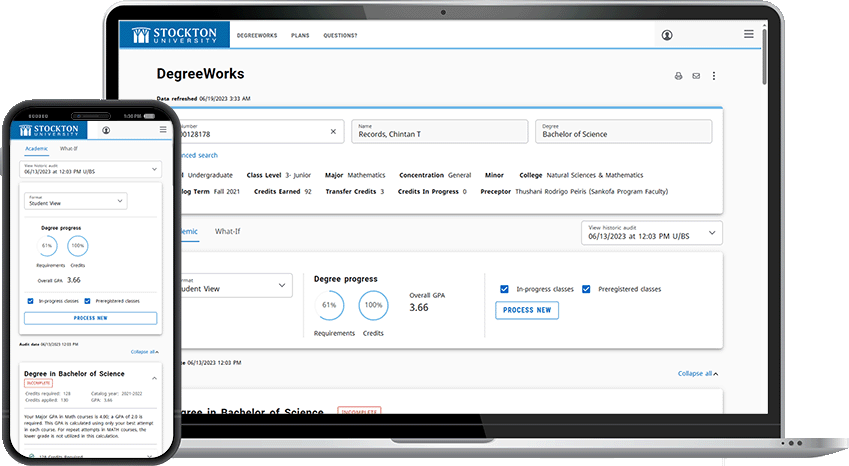
- Degree Works provides you with an electronic degree evaluation of your progress toward your degree.
It summarizes your progress based on your academic record, and will assist you in
selecting future courses.
- Degree Works is available to you 24/7 on the goStockton portal. You will find it on the Student Services tab. Choose "Degree Works Evaluation and Tools" from the list of Registration Tools in the top left corner of the tab.
- Degree Works is a tool for you to use in advising sessions with your Preceptor. It is not designed
to take the place of meetings with your Preceptor. Your Preceptor is extremely valuable
to you in interpreting the results of CAPP and making future course selections.
Degree Works can provide you with:
-
- A comprehensive semester-by-semester course planner
Look-Ahead features for future courses - What-If evaluations for other majors and minors
- GPA Calculators
- A comprehensive semester-by-semester course planner
Degree Works & Registration Training Videos:
Overview of New Mobile Friendly Degree Works
Overview for Faculty Advisors
Using Search and Find
How to use "Look Ahead"
How to add Notes
How to Browse and Register for Classes
How Do I Read the Degree Works Progress Circle?
The progress circle in Degree Works gives you a quick visual estimate of how much of your degree program you’ve completed. It appears near the top of your Degree Works audit and fills in as you complete requirements.
What the Progress Circle Shows
- The percentage inside the circle reflects the portion of your degree requirements that are marked as complete.
- As courses are completed and requirements are met, the circle fills in and the percentage increases.
- When all degree requirements are satisfied and graded, the circle will show 100%.
What the Progress Circle Is Based On
The progress circle is calculated using:
- Completed coursework
- In-progress courses
- Degree requirements that are marked as fulfilled in your audit
It is tied to requirements, not simply the number of credits earned.
What the Progress Circle Does Not Show
- It does not guarantee that you are eligible to graduate.
- It does not account for:
- Pending grades
- Transfer credits still under review
- Course substitutions or waivers that have not been approved
- GPA requirements
- Residency requirements (such as minimum institutional credits)
Because of this, the percentage should be viewed as an estimate, not a final determination.
Why the Percentage Might Seem Lower or Higher Than Expected
You may notice the progress percentage change in ways that don’t seem intuitive. This can happen because:
- Courses in progress may count differently until final grades are posted.
- Changes to your major, minor, or catalog year can reset or recalculate progress.
How to Use the Progress Circle Effectively
- Use it as a quick snapshot of overall progress.
- Always review the full Degree Audit below the circle for detailed requirement status.
- Look for color-coding (such as green checkmarks or “Complete” labels) to confirm which requirements are finished.
Important Reminder
The progress circle is a helpful planning tool, but it is not an official graduation clearance.Understanding Degree Works Status Grades
PR – Pre-Registered
- Indicates the student has registered for a course in a future term.
- The term has not yet started.
- The course is planned but not currently underway.
- Requirements may appear as “in progress” toward degree completion, but the course has not begun.
IP – In-Progress
- Indicates the student is currently enrolled in a course during an active term
- The term has started, but final grades have not yet been posted
- The course is actively counting toward degree requirements, pending successful completion.
-
Key Reminders
- IP and PR are Degree Works indicators only — they do not appear on transcripts.
- Degree progress circles may not reach 100% until all IP courses are completed and graded.
Need more help?
If you have questions about the curriculum on your Degree Works audit, please see your Preceptor first. If you have questions about how to work Degree Works and it’s tools, or you still need further explanation, contact The Center for Academic Advising at 609-652-4504.
Degree Works Disclaimer
You are encouraged to use this degree audit report as a guide when planning your progress toward completion of the above requirements. Your academic advisor, the Center for Academic Advising, or the Registrar's Office may be contacted for assistance in interpreting this report.
- This audit is not your academic transcript and it is not official notification of completion of degree or certificate requirements.
- Please contact the Registrar's Office regarding this degree audit report, your official degree/certificate completion status, or to obtain a copy of your academic transcript.